728x90
반응형
우분투 24.04에서 APT로 최신 HAProxy를 설치하고 상태 페이지를 구성하는 방법
우분투 24.04 환경에서 최신 HAProxy 3.3 버전을 설치하고 통계(Stats) 페이지까지 구성하는 방법입니다.
1. 사전 준비
패키지 목록을 최신 상태로 갱신하고 기본 도구를 설치합니다.
sudo apt update
sudo apt install -y wget gnupg ca-certificates
2. HAProxy 공식 저장소 등록
Keyring 디렉터리 생성
sudo install -d -m 0755 /usr/share/keyringsGPG 키 다운로드
sudo wget -qO /usr/share/keyrings/HAPROXY-key-community.asc https://pks.haproxy.com/linux/community/RPM-GPG-KEY-HAProxy저장소 추가 (HAProxy 3.3)
echo "deb [arch=amd64 signed-by=/usr/share/keyrings/HAPROXY-key-community.asc] https://www.haproxy.com/download/haproxy/performance/ubuntu/ha32 noble main" | sudo tee /etc/apt/sources.list.d/haproxy.list3. HAProxy 설치
최적화 빌드(AWS-LC TLS 라이브러리 적용 버전)를 설치합니다.
sudo apt-get updatesudo apt-get install haproxy-awslc설치 버전 확인
haproxy -vHAProxy version 3.3.6-0+ha33+ubuntu24.04u3 2026/03/23 - https://haproxy.org/
Status: stable branch - will stop receiving fixes around Q1 2027.
Known bugs: http://www.haproxy.org/bugs/bugs-3.3.6.html
Running on: Linux 6.8.0-41-generic #41-Ubuntu SMP PREEMPT_DYNAMIC Fri Aug 2 20:41:06 UTC 2024 x86_644. HAProxy 계정 생성
보안 강화를 위해 서비스 전용 계정을 생성할 수 있습니다.
sudo groupadd --system haproxysudo useradd --system -g haproxy -d /var/lib/haproxy -s /sbin/nologin haproxy5. HAProxy 설정 파일 수정
vim /etc/haproxy/haproxy.cfglisten stats
bind *:9999
mode http
stats enable
stats uri /monitor
stats refresh 5s
stats realm Haproxy\ Statistics
stats auth admin:admin
stats admin if LOCALHOST6. 설정 파일 문법 검사
sudo haproxy -c -f /etc/haproxy/haproxy.cfg7. 서비스 시작 및 자동 실행 등록
sudo systemctl enable --now haproxy상태 확인
sudo systemctl status haproxy8. 상태 진단
프로세스 확인
ps -ef | grep haproxy포트 확인
ss -nltp | grep 9999로그 확인
sudo journalctl -u haproxy -n 50 --no-pager9. 웹 통계 페이지 접속
브라우저에서 아래 주소로 접속합니다.
http://서버IP:9999/monitor로그인 계정
- ID : admin
- PW : admin
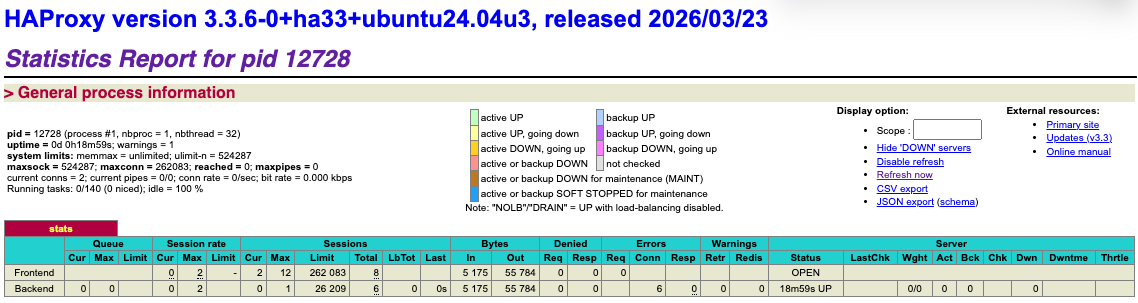
우분투 기본 저장소보다 공식 저장소를 사용하면 최신 기능과 성능 개선 버전을 빠르게 사용할 수 있습니다.
특히 L4/L7 로드밸런서, Reverse Proxy, SSL Offloading 환경에서는 최신 버전 사용을 권장합니다.
참고URL
- HAProxy : HAProxy Repository Setup for Ubuntu
728x90
반응형
'리눅스' 카테고리의 다른 글
| dd 명령어로 사용자 체감 속도 기준 디스크 성능 테스트하기 (0) | 2026.04.23 |
|---|---|
| 리눅스 arping 명령어 사용법 정리 (0) | 2026.04.20 |
| 우분투 24.04에서 Keycloak HA 클러스터를 구성하는 방법 (0) | 2026.04.15 |
| 우분투 24.04에서 OpenLDAP를 Multi-Master로 구성하는 방법 (0) | 2026.04.14 |
| 우분투 24.04에서 HashiCorp Vault SSH OTP를 설치하고 PAM을 연동하는 방법 (0) | 2026.04.09 |


