리눅스
Linux Bash 명령어 이력을 Syslog로 중앙 수집하는 방법
변군이글루
2026. 5. 11. 21:24
반응형
Linux Bash 명령어 이력을 Syslog로 중앙 수집하는 방법
리눅스 서버 운영 환경에서는 사용자의 쉘(Bash) 명령어 이력을 안전하게 기록하고 중앙 로그 서버로 전송하는 것이 매우 중요합니다.
테스트 환경
운영체제 : Ubuntu 22.04/24.04
Syslog : rsyslog
Shell : bash
아키텍처
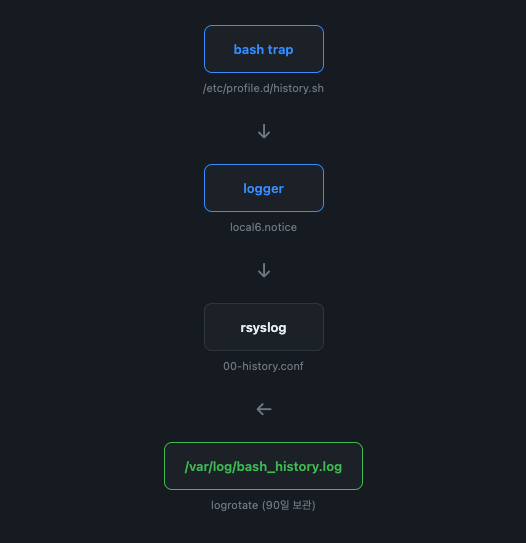
1. rsyslog 설정
Bash History 전용 로그 설정
sudo tee /etc/rsyslog.d/00-history.conf <<'EOF'
if $programname == 'bash_history' then {
    # 로컬 파일 저장
    action(type="omfile"
           file="/var/log/bash_history.log")

    # 중앙 로그 서버로 TCP 전송 (UDP보다 신뢰성 높음)
    action(type="omfwd"
           target="logserv.scbyun.com"
           port="514"
           protocol="tcp")

    # 이 규칙에서 처리 완료 — 다른 규칙 중복 방지
    stop
}
EOF
2. 로그 로테이션 설정
로그 파일이 무한히 증가하지 않도록 logrotate 설정을 추가합니다.
sudo tee /etc/logrotate.d/bash_history <<'EOF'
/var/log/bash_history.log {
    daily            # 매일 순환
    missingok        # 파일 없어도 오류 없음
    rotate 90        # 90개 보관 (= 약 3개월)
    compress         # gzip 압축
    delaycompress    # 최신 1개는 압축 지연 (rsyslog 접근 충돌 방지)
    notifempty       # 빈 파일은 순환 건너뜀
    create 0600 root root  # 새 파일 권한 (root만 읽기)
    sharedscripts    # postrotate를 한 번만 실행
    postrotate
        # rsyslog에 HUP 신호 → 새 파일로 재오픈
        /usr/bin/systemctl kill -s HUP rsyslog.service >/dev/null 2>&1 || true
    endscript
}
EOF
설정 문법 검사
sudo rsyslogd -N1적용
sudo systemctl restart rsyslog728x90
3. Bash 명령어 감사 스크립트 설정
profile 스크립트 생성
sudo tee /etc/profile.d/history.sh <<'EOF'
# 인터랙티브 셸에서만 활성화 (스크립트 실행 시 성능 영향 방지)
if [[ $- != *i* ]]; then
    return
fi

function history_to_syslog()
{
    # 재귀 방지: trap 일시 해제
    trap - DEBUG

    local cmd="${BASH_COMMAND}"

    # 기록 제외 대상 (내부 함수 / 노이즈 명령)
    case "$cmd" in
        history_to_syslog*|\
        logger*|\
        trap*|\
        local\ cmd*|\
        who\ am\ i*|\
        tty|\
        pwd|\
        ls*|\
        return*)
            trap 'history_to_syslog' DEBUG
            return
            ;;
    esac

    logger -p local6.notice -t bash_history \
    "USER=$(whoami) \
IP=$(who am i | awk '{print $5}') \
PWD=$(pwd) \
TTY=$(tty) \
CMD=${cmd}"

    # trap 재등록
    trap 'history_to_syslog' DEBUG
}

# 모든 인터랙티브 셸에서 trap 활성화
trap 'history_to_syslog' DEBUG
EOF
적용
source /etc/profile.d/history.sh5. 로그 확인
로컬 로그 확인
tail -f /var/log/bash_history.log6. 원격 로그 서버 확인
중앙 로그 서버에서 다음과 같이 수신 여부를 확인합니다.
tcpdump -i any port 514또는
tail -f /var/log/syslog
728x90
반응형