네트워크
Cisco 스위치 - 인터페이스 IP, 기본 게이트웨이, Speed & Duplex 설정
변군이글루
2013. 7. 23. 23:52
반응형
Cisco 스위치 - 인터페이스 IP, 기본 게이트웨이, Speed & Duplex 설정
L2 스위치에서는 일반적으로 관리용 인터페이스인 SVI(Switch Virtual Interface)에 IP를 설정한다. 대부분 기본 VLAN 1에 관리 IP를 설정하며, 이를 통해 스위치에 원격 접속(Telnet/SSH)이 가능해진다.
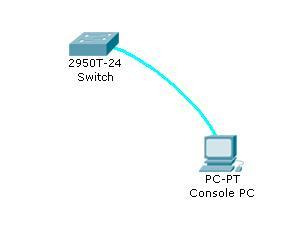
1. VLAN 1에 관리 IP 설정
L2 스위치는 실제 인터페이스에 IP를 직접 입력하지 않고 관리 VLAN 인터페이스(SVI)에 IP를 입력한다.
먼저 현재 스위치에 설정된 VLAN 정보를 확인한다.
show vlanSwitch#show vlan
VLAN Name Status Ports
---- -------------------------------- --------- -------------------------------
1 default active Fa0/1, Fa0/2, Fa0/3, Fa0/4
Fa0/5, Fa0/6, Fa0/7, Fa0/8
Fa0/9, Fa0/10, Fa0/11, Fa0/12
Fa0/13, Fa0/14, Fa0/15, Fa0/16
Fa0/17, Fa0/18, Fa0/19, Fa0/20
Fa0/21, Fa0/22, Fa0/23, Fa0/24
Gig1/1, Gig1/2
1002 fddi-default active
1003 token-ring-default active
1004 fddinet-default active
1005 trnet-default active
VLAN Type SAID MTU Parent RingNo BridgeNo Stp BrdgMode Trans1 Trans2
---- ----- ---------- ----- ------ ------ -------- ---- -------- ------ ------
1 enet 100001 1500 - - - - - 0 0
1002 enet 101002 1500 - - - - - 0 0
1003 enet 101003 1500 - - - - - 0 0
1004 enet 101004 1500 - - - - - 0 0
1005 enet 101005 1500 - - - - - 0 0VLAN 1이 기본 VLAN이므로 여기에 IP를 설정한다.
Switch>enable
Switch#conf t
Enter configuration commands, one per line.  End with CNTL/Z.
Switch(config)#interface vlan 1
Switch(config-if)#ip address 190.190.180.100 255.255.255.0
Switch(config-if)#exit
Switch(config)#exit
%SYS-5-CONFIG_I: Configured from console by console
설정이 적용되었는지 확인한다.
show interfaces vlan 1Switch#show interfaces vlan 1
Vlan1 is administratively down, line protocol is down
Hardware is CPU Interface, address is 0090.2195.9942 (bia 0090.2195.9942)
Internet address is 190.190.180.100/24
MTU 1500 bytes, BW 100000 Kbit, DLY 1000000 usec,
reliability 255/255, txload 1/255, rxload 1/255
Encapsulation ARPA, loopback not set
ARP type: ARPA, ARP Timeout 04:00:00
Last input 21:40:21, output never, output hang never
Last clearing of "show interface" counters never
Input queue: 0/75/0/0 (size/max/drops/flushes); Total output drops: 0
Queueing strategy: fifo
Output queue: 0/40 (size/max)
5 minute input rate 0 bits/sec, 0 packets/sec
5 minute output rate 0 bits/sec, 0 packets/sec
1682 packets input, 530955 bytes, 0 no buffer
Received 0 broadcasts (0 IP multicast)
0 runts, 0 giants, 0 throttles
0 input errors, 0 CRC, 0 frame, 0 overrun, 0 ignored
563859 packets output, 0 bytes, 0 underruns
0 output errors, 23 interface resets
0 output buffer failures, 0 output buffers swapped out참고
administratively down 이 보인다면 no shutdown 명령으로 인터페이스를 활성화해야 한다.
2. 기본 게이트웨이 설정
L2 스위치는 라우팅 기능이 없으므로, 다른 네트워크에서 접근하려면 기본 게이트웨이가 필요하다.
Switch#conf t
Switch(config)#ip default-gateway 190.190.180.1
Switch(config)#exit
이 명령은 글로벌 설정 모드에서 입력해야 한다.
3. Speed & Duplex 설정
스위치 포트의 속도와 이중 방식은 기본적으로 Auto-Negotiation으로 동작한다.
하지만 일부 장비와 연결 시 속도를 서로 맞추지 못해 통신 장애가 발생할 수 있다.
이 경우 포트 속성과 Duplex를 수동으로 지정해야 한다.
Switch#conf t
Switch(config)#interface fastEthernet 0/1
지원 속도 확인
Switch(config-if)#speed ?
  10    Force 10 Mbps operation
  100   Force 100 Mbps operation
  auto  Enable AUTO speed configuration
예: 10Mbps / Half Duplex로 고정
Switch(config-if)#speed 10
Switch(config-if)#duplex ?
  auto  Enable AUTO duplex configuration
  full  Force full duplex operation
  half  Force half-duplex operation

Switch(config-if)#duplex half
설정 후 실제 상태를 확인한다.
Switch#show interfaces fastEthernet 0/1

FastEthernet0/1 is up, line protocol is up (connected)
  Hardware is Lance, address is 0060.5cc9.cd01 (bia 0060.5cc9.cd01)
  MTU 1500 bytes, BW 10000 Kbit, DLY 1000 usec,
     reliability 255/255, txload 1/255, rxload 1/255
  Encapsulation ARPA, loopback not set
  Keepalive set (10 sec)
  Half-duplex, 10Mb/s
  input flow-control is off, output flow-control is off
  ARP type: ARPA, ARP Timeout 04:00:00
  Last input 00:00:08, output 00:00:05, output hang never
  Last clearing of "show interface" counters never
  Input queue: 0/75/0/0 (size/max/drops/flushes); Total output drops: 0
  Queueing strategy: fifo
  Output queue :0/40 (size/max)
  5 minute input rate 0 bits/sec, 0 packets/sec
  5 minute output rate 0 bits/sec, 0 packets/sec
     956 packets input, 193351 bytes, 0 no buffer
     Received 956 broadcasts, 0 runts, 0 giants, 0 throttles
     0 input errors, 0 CRC, 0 frame, 0 overrun, 0 ignored, 0 abort
     0 watchdog, 0 multicast, 0 pause input
     0 input packets with dribble condition detected
     2357 packets output, 263570 bytes, 0 underruns
     0 output errors, 0 collisions, 10 interface resets
     0 babbles, 0 late collision, 0 deferred
     0 lost carrier, 0 no carrier
     0 output buffer failures, 0 output buffers swapped out
이제 포트가 10Mbps / Half Duplex로 정상 동작 중임을 확인할 수 있다.
728x90
반응형