728x90
반응형
Terraform으로 AWS VPC 생성하기 (Provider 구성 포함)
Terraform을 사용하여 AWS VPC를 생성하는 기본 실습입니다.
Provider 설정 → 리소스 정의 → 실행(init/plan/apply) 순서로 진행합니다.
1. 작업 디렉터리 생성
mkdir terraform
cd $_
2. Provider 정의
vim provider.tfterraform {
required_version = ">= 1.3.0"
required_providers {
aws = {
source = "hashicorp/aws"
version = "~> 3.25"
}
}
}
provider "aws" {
region = var.aws_region
profile = var.aws_profile
}3. 변수 정의 (권장)
하드코딩 대신 변수 사용을 권장합니다.
vim variables.tfvariable "aws_region" {
default = "us-east-1"
}
variable "aws_profile" {
default = "tfa"
}
variable "vpc_cidr" {
default = "10.99.0.0/16"
}
variable "vpc_name" {
default = "vpc99"
}4. VPC 리소스 정의
vim vpc.tfresource "aws_vpc" "vpc99" {
cidr_block = var.vpc_cidr
enable_dns_support = true
enable_dns_hostnames = true
tags = {
Name = var.vpc_name
}
}5. Terraform 초기화
terraform initInitializing the backend...
Initializing provider plugins...
- Reusing previous version of hashicorp/aws from the dependency lock file
- Installing hashicorp/aws v3.25.0...
- Installed hashicorp/aws v3.25.0 (signed by HashiCorp)
Terraform has been successfully initialized!
You may now begin working with Terraform. Try running "terraform plan" to see
any changes that are required for your infrastructure. All Terraform commands
should now work.
If you ever set or change modules or backend configuration for Terraform,
rerun this command to reinitialize your working directory. If you forget, other
commands will detect it and remind you to do so if necessary.Provider 플러그인 다운로드 및 초기화 수행
6. 실행 계획 확인
terraform plan -out=tfplanAn execution plan has been generated and is shown below.
Resource actions are indicated with the following symbols:
+ create
Terraform will perform the following actions:
# aws_vpc.vpc99 will be created
+ resource "aws_vpc" "vpc99" {
+ arn = (known after apply)
+ assign_generated_ipv6_cidr_block = false
+ cidr_block = "10.99.0.0/16"
+ default_network_acl_id = (known after apply)
+ default_route_table_id = (known after apply)
+ default_security_group_id = (known after apply)
+ dhcp_options_id = (known after apply)
+ enable_classiclink = (known after apply)
+ enable_classiclink_dns_support = (known after apply)
+ enable_dns_hostnames = (known after apply)
+ enable_dns_support = true
+ id = (known after apply)
+ instance_tenancy = "default"
+ ipv6_association_id = (known after apply)
+ ipv6_cidr_block = (known after apply)
+ main_route_table_id = (known after apply)
+ owner_id = (known after apply)
+ tags = {
+ "Name" = "vpc99"
}
}
Plan: 1 to add, 0 to change, 0 to destroy.
------------------------------------------------------------------------
Note: You didn't specify an "-out" parameter to save this plan, so Terraform
can't guarantee that exactly these actions will be performed if
"terraform apply" is subsequently run.
-out 옵션 사용 → 실행 일관성 보장 (운영 필수)
7. 인프라 생성
terraform apply tfplan또는 간단 실행
terraform applyAn execution plan has been generated and is shown below.
Resource actions are indicated with the following symbols:
+ create
Terraform will perform the following actions:
# aws_vpc.vpc99 will be created
+ resource "aws_vpc" "vpc99" {
+ arn = (known after apply)
+ assign_generated_ipv6_cidr_block = false
+ cidr_block = "10.99.0.0/16"
+ default_network_acl_id = (known after apply)
+ default_route_table_id = (known after apply)
+ default_security_group_id = (known after apply)
+ dhcp_options_id = (known after apply)
+ enable_classiclink = (known after apply)
+ enable_classiclink_dns_support = (known after apply)
+ enable_dns_hostnames = (known after apply)
+ enable_dns_support = true
+ id = (known after apply)
+ instance_tenancy = "default"
+ ipv6_association_id = (known after apply)
+ ipv6_cidr_block = (known after apply)
+ main_route_table_id = (known after apply)
+ owner_id = (known after apply)
+ tags = {
+ "Name" = "vpc99"
}
}
Plan: 1 to add, 0 to change, 0 to destroy.
Do you want to perform these actions?
Terraform will perform the actions described above.
Only 'yes' will be accepted to approve.
Enter a value: yes
aws_vpc.vpc99: Creating...
aws_vpc.vpc99: Still creating... [10s elapsed]
aws_vpc.vpc99: Creation complete after 11s [id=vpc]
Apply complete! Resources: 1 added, 0 changed, 0 destroyed.
8. 실행 결과 확인
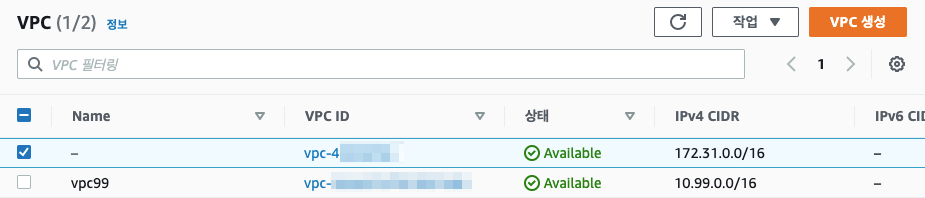
terraform showvpc99이름으로 VPC 생성되었다.
9. 리소스 삭제
terraform destroy10. 디렉토리 구조
terraform/
├── provider.tf
├── variables.tf
├── vpc.tf
├── terraform.tfstate
├── terraform.tfstate.backup
└── .terraform/
728x90
반응형
'퍼블릭 클라우드' 카테고리의 다른 글
| Terraform으로 AWS VPC 생성하기 (0) | 2021.01.29 |
|---|---|
| Terraform AWS Provider 설정 방법 (Profile 기반) (0) | 2021.01.29 |
| CentOS 7에서 Terraform을 설치하는 방법 (0) | 2021.01.26 |
| AWS RDS mysqldump(backup) error (0) | 2021.01.12 |
| Amazon Route 53에서 레코드를 생성하고 편집하는 방법 (0) | 2021.01.06 |


