728x90
반응형
리눅스 ping 명령어 사용법 정리
ping 명령어는 네트워크 연결 상태를 확인하기 위해 사용하는 가장 기본적인 도구이다.
ICMP(Internet Control Message Protocol) Echo Request 패킷을 전송하여 대상 시스템의 응답 여부와 지연 시간(latency) 을 확인할 수 있다.
기본 사용법
기본 명령어 형식
ping [옵션] 호스트예시
ping google.comPING google.com (172.217.24.142) 56(84) bytes of data.
64 bytes from 172.217.24.142: icmp_seq=1 ttl=104 time=31.9 ms
64 bytes from 172.217.24.142: icmp_seq=2 ttl=104 time=31.8 ms
64 bytes from 172.217.24.142: icmp_seq=3 ttl=104 time=32.0 msping 결과에 타임스탬프 추가
기본 ping 명령은 시간 정보가 출력되지 않는다.
xargs와 date 명령을 사용하면 로그 형태로 시간 정보를 추가할 수 있다.
ping google.com | xargs -n1 -I{} bash -c 'echo "$(date +%F\ %T) {}"'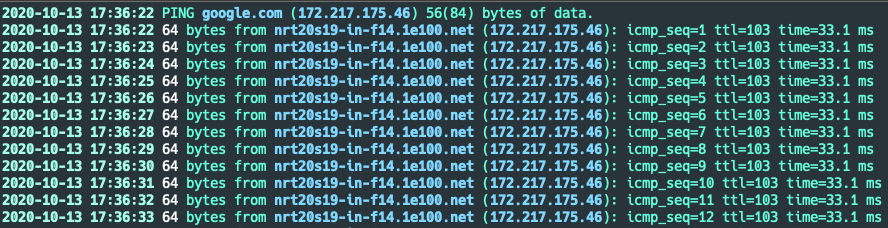
728x90
ping 출력 결과 색상 표시
로그 가독성을 높이기 위해 ccze 프로그램을 사용할 수 있다.
ccze 설치
- RHEL/CentOS 계열
yum install -y ccze- Ubuntu/Debian 계열
apt install -y ccze색상 출력 ping 실행
- -A : ANSI 컬러 출력
ping google.com | xargs -n1 -I{} bash -c 'echo "$(date +%F\ %T) {}"' | ccze -A2020-10-13 17:38:02 PING google.com (172.217.24.142) 56(84) bytes of data.
2020-10-13 17:38:02 64 bytes from nrt20s01-in-f14.1e100.net (172.217.24.142): icmp_seq=1 ttl=104 time=31.9 ms
2020-10-13 17:38:03 64 bytes from nrt20s01-in-f14.1e100.net (172.217.24.142): icmp_seq=2 ttl=104 time=31.9 ms
2020-10-13 17:38:04 64 bytes from nrt20s01-in-f14.1e100.net (172.217.24.142): icmp_seq=3 ttl=104 time=32.0 ms로그 파일로 저장
네트워크 모니터링을 위해 ping 결과를 로그 파일로 저장할 수 있다.
ping google.com | xargs -n1 -I{} bash -c 'echo "$(date +%F\ %T) {}"' | tee ping.log2024-10-13 17:38:02 64 bytes from 172.217.24.142: icmp_seq=1 ttl=104 time=31.9 ms
2024-10-13 17:38:03 64 bytes from 172.217.24.142: icmp_seq=2 ttl=104 time=31.8 ms실무에서 자주 사용하는 ping 명령
10번만 테스트
ping -c 10 google.com1초 간격 ping
ping -i 1 google.com네트워크 장애 모니터링
ping google.com | tstimestamp + 색상 출력
ping google.com | xargs -n1 -I{} bash -c 'echo "$(date +%F\ %T) {}"' | ccze -Aping 동작 구조
ping은 다음 과정을 통해 네트워크 상태를 확인한다.
Host A
   │
   │  ICMP Echo Request
   ▼
Host B
   │
   │  ICMP Echo Reply
   ▼
Host A
728x90
반응형
'리눅스' 카테고리의 다른 글
| openssl 인증서 만료일 조회 (0) | 2020.10.14 |
|---|---|
| 리눅스 ccze 명령어 (0) | 2020.10.13 |
| NGINX에서 POST 데이터를 액세스 로그에 기록하는 방법 (0) | 2020.10.06 |
| 리눅스 jq 명령어 사용법 정리 (0) | 2020.10.06 |
| 쿠버네티스 클러스터에서 Helm을 설치하는 방법 (1) | 2020.10.06 |


