728x90
반응형
우분투 24.04 서버에서 Uptime Kuma를 설치하는 방법
Uptime Kuma는 간단하게 서버/서비스 상태를 모니터링할 수 있는 강력한 웹 UI 도구입니다.
Docker
1. Docker 설치
sudo apt update
sudo apt install -y ca-certificates curl gnupg

sudo install -m 0755 -d /etc/apt/keyrings
curl -fsSL https://download.docker.com/linux/ubuntu/gpg | sudo gpg --dearmor -o /etc/apt/keyrings/docker.gpg

echo \
  "deb [arch=$(dpkg --print-architecture) signed-by=/etc/apt/keyrings/docker.gpg] \
  https://download.docker.com/linux/ubuntu $(lsb_release -cs) stable" \
  | sudo tee /etc/apt/sources.list.d/docker.list > /dev/null

sudo apt update
sudo apt install -y docker-ce docker-ce-cli containerd.io docker-compose-plugin
2. Uptime Kuma 컨테이너 실행
mkdir -p /docker-container/uptime-kumacd /docker-container/uptime-kumavim docker-compose.ymlservices:
uptime-kuma:
image: louislam/uptime-kuma:latest
container_name: uptime-kuma
hostname: uptime-kuma
restart: always
volumes:
- /usr/share/zoneinfo/Asia/Seoul:/etc/localtime:ro
- ./uptime-kuma:/app/data
ports:
- "3001:3001"
networks:
default:
name: uptime-kuma-net실행
docker compose up -d브라우저 접속
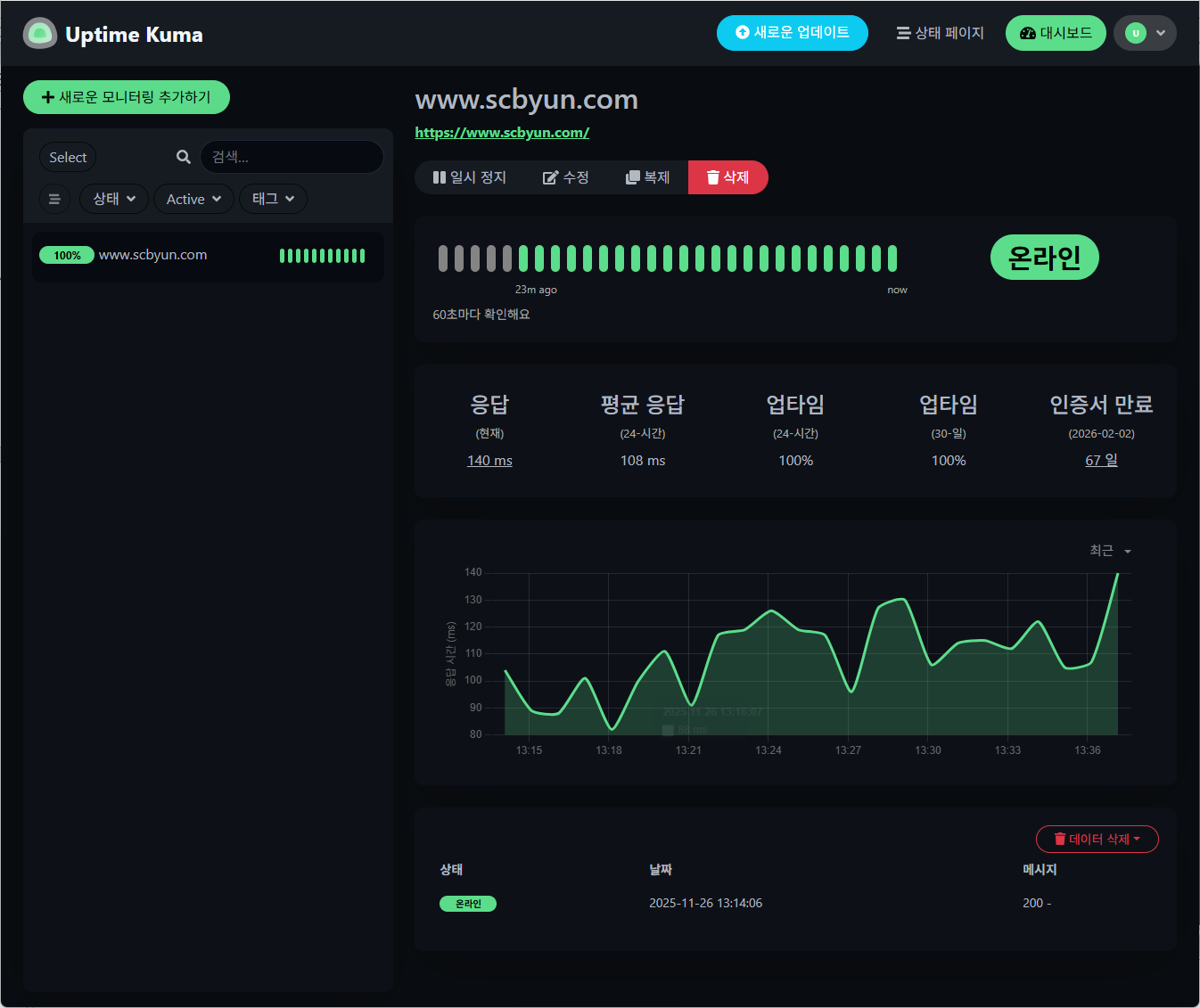
http://서버IP:30013. 모니터링 등록
728x90
4. 업데이트
vim docker-compose.ymlservices:
uptime-kuma:
image: louislam/uptime-kuma:2
container_name: uptime-kuma
hostname: uptime-kuma
restart: always
volumes:
- /usr/share/zoneinfo/Asia/Seoul:/etc/localtime:ro
- ./uptime-kuma:/app/data
ports:
- "3001:3001"
networks:
default:
name: uptime-kuma-netuptime-kuma:2 이미지 다운로드
docker compose pull[+] pull 16/16
✔ Image louislam/uptime-kuma:2 Pulled 25.3s컨테이너 재실행
docker compose down -vdocker compose up -d브라우저 접속
http://서버IP:3001Migration is in progress, it may take some time. You can check the progress in the console, or click here to check.docker compose logs -f더보기
---
uptime-kuma  | Welcome to Uptime Kuma
uptime-kuma  | Your Node.js version: 20.19.5
uptime-kuma  | 2025-12-11T00:39:06Z [SERVER] INFO: Env: production
uptime-kuma  | 2025-12-11T00:39:07Z [SERVER] INFO: Uptime Kuma Version: 2.0.2
uptime-kuma  | 2025-12-11T00:39:07Z [SERVER] INFO: Loading modules
uptime-kuma  | 2025-12-11T00:39:08Z [SERVER] INFO: Creating express and socket.io instance
uptime-kuma  | 2025-12-11T00:39:08Z [SERVER] INFO: Server Type: HTTP
uptime-kuma  | 2025-12-11T00:39:08Z [SERVER] INFO: Data Dir: ./data/
uptime-kuma  | 2025-12-11T00:39:08Z [SETUP-DATABASE] INFO: db-config.json is not found or invalid: ENOENT: no such file or directory, open 'data/db-config.json'
uptime-kuma  | 2025-12-11T00:39:08Z [SETUP-DATABASE] INFO: kuma.db is found, generate db-config.json
uptime-kuma  | 2025-12-11T00:39:08Z [DB] INFO: Database Type: sqlite
uptime-kuma  | 2025-12-11T00:39:08Z [SERVER] INFO: Connected to the database
uptime-kuma  | 2025-12-11T00:39:09Z [MIGRATION] INFO: Migration server is running on http://localhost:3001
uptime-kuma  | 2025-12-11T00:39:09Z [DB] INFO: Migrating Aggregate Table
uptime-kuma  | 2025-12-11T00:39:09Z [DB] INFO: Getting list of unique monitors
uptime-kuma  | 2025-12-11T00:39:09Z [DB] INFO: [DON'T STOP] Migrating monitor data 1 - 2025-12-08 [0.00%][1/6]
uptime-kuma  | 2025-12-11T00:39:10Z [DB] INFO: [DON'T STOP] Migrating monitor data 1 - 2025-12-09 [4.17%][1/6]
uptime-kuma  | 2025-12-11T00:39:11Z [DB] INFO: [DON'T STOP] Migrating monitor data 1 - 2025-12-10 [8.34%][1/6]
uptime-kuma  | 2025-12-11T00:39:13Z [DB] INFO: [DON'T STOP] Migrating monitor data 1 - 2025-12-11 [12.51%][1/6]
uptime-kuma  | 2025-12-11T00:39:13Z [DB] INFO: [DON'T STOP] Migrating monitor data 2 - 2025-12-08 [16.68%][2/6]
uptime-kuma  | 2025-12-11T00:39:14Z [DB] INFO: [DON'T STOP] Migrating monitor data 2 - 2025-12-09 [20.85%][2/6]
uptime-kuma  | 2025-12-11T00:39:15Z [DB] INFO: [DON'T STOP] Migrating monitor data 2 - 2025-12-10 [25.02%][2/6]
uptime-kuma  | 2025-12-11T00:39:17Z [DB] INFO: [DON'T STOP] Migrating monitor data 2 - 2025-12-11 [29.19%][2/6]
uptime-kuma  | 2025-12-11T00:39:17Z [DB] INFO: [DON'T STOP] Migrating monitor data 3 - 2025-12-08 [33.36%][3/6]
uptime-kuma  | 2025-12-11T00:39:18Z [DB] INFO: [DON'T STOP] Migrating monitor data 3 - 2025-12-09 [37.53%][3/6]
uptime-kuma  | 2025-12-11T00:39:19Z [DB] INFO: [DON'T STOP] Migrating monitor data 3 - 2025-12-10 [41.70%][3/6]
uptime-kuma  | 2025-12-11T00:39:21Z [DB] INFO: [DON'T STOP] Migrating monitor data 3 - 2025-12-11 [45.87%][3/6]
uptime-kuma  | 2025-12-11T00:39:21Z [DB] INFO: [DON'T STOP] Migrating monitor data 4 - 2025-12-08 [50.04%][4/6]
uptime-kuma  | 2025-12-11T00:39:22Z [DB] INFO: [DON'T STOP] Migrating monitor data 4 - 2025-12-09 [54.21%][4/6]
uptime-kuma  | 2025-12-11T00:39:23Z [DB] INFO: [DON'T STOP] Migrating monitor data 4 - 2025-12-10 [58.38%][4/6]
uptime-kuma  | 2025-12-11T00:39:25Z [DB] INFO: [DON'T STOP] Migrating monitor data 4 - 2025-12-11 [62.55%][4/6]
uptime-kuma  | 2025-12-11T00:39:25Z [DB] INFO: [DON'T STOP] Migrating monitor data 5 - 2025-12-08 [66.72%][5/6]
uptime-kuma  | 2025-12-11T00:39:26Z [DB] INFO: [DON'T STOP] Migrating monitor data 5 - 2025-12-09 [70.89%][5/6]
uptime-kuma  | 2025-12-11T00:39:27Z [DB] INFO: [DON'T STOP] Migrating monitor data 5 - 2025-12-10 [75.06%][5/6]
uptime-kuma  | 2025-12-11T00:39:29Z [DB] INFO: [DON'T STOP] Migrating monitor data 5 - 2025-12-11 [79.23%][5/6]
uptime-kuma  | 2025-12-11T00:39:29Z [DB] INFO: [DON'T STOP] Migrating monitor data 6 - 2025-12-08 [83.40%][6/6]
uptime-kuma  | 2025-12-11T00:39:31Z [DB] INFO: [DON'T STOP] Migrating monitor data 6 - 2025-12-09 [87.57%][6/6]
uptime-kuma  | 2025-12-11T00:39:32Z [DB] INFO: [DON'T STOP] Migrating monitor data 6 - 2025-12-10 [91.74%][6/6]
uptime-kuma  | 2025-12-11T00:39:34Z [DB] INFO: [DON'T STOP] Migrating monitor data 6 - 2025-12-11 [95.91%][6/6]
uptime-kuma  | 2025-12-11T00:39:34Z [DB] INFO: Clearing non-important heartbeats
uptime-kuma  | 2025-12-11T00:39:34Z [DB] INFO: Deleting non-important heartbeats for monitor 1
uptime-kuma  | 2025-12-11T00:39:34Z [DB] INFO: Deleting non-important heartbeats for monitor 2
uptime-kuma  | 2025-12-11T00:39:34Z [DB] INFO: Deleting non-important heartbeats for monitor 3
uptime-kuma  | 2025-12-11T00:39:34Z [DB] INFO: Deleting non-important heartbeats for monitor 4
uptime-kuma  | 2025-12-11T00:39:34Z [DB] INFO: Deleting non-important heartbeats for monitor 5
uptime-kuma  | 2025-12-11T00:39:34Z [DB] INFO: Deleting non-important heartbeats for monitor 6
uptime-kuma  | 2025-12-11T00:39:34Z [DB] INFO: Aggregate Table Migration Completed
uptime-kuma  | 2025-12-11T09:39:34+09:00 [SERVICES] INFO: Starting nscd
uptime-kuma  | 2025-12-11T09:39:34+09:00 [SERVER] INFO: Listening on 3001
---
네이티브 설치(Node.js 직접 실행)
필요한 패키지 설치
sudo apt update
sudo apt install -y git curl
Node.js LTS 설치
curl -fsSL https://deb.nodesource.com/setup_lts.x | sudo -E bash -
sudo apt install -y nodejs
Uptime Kuma 다운로드
cd /opt
sudo git clone https://github.com/louislam/uptime-kuma.git
cd uptime-kuma
패키지 설치
npm install --production테스트 실행
npm run start-server브라우저 접속
http://서버IP:3001서비스 등록(자동 실행)
sudo vim /etc/systemd/system/uptime-kuma.service[Unit]
Description=Uptime Kuma
After=network.target
[Service]
Type=simple
User=root
WorkingDirectory=/opt/uptime-kuma
ExecStart=/usr/bin/npm run start-server
Restart=always
[Install]
WantedBy=multi-user.target서비스 적용 & 시작
sudo systemctl daemon-reload
sudo systemctl enable --now uptime-kuma
상태 확인
sudo systemctl status uptime-kuma
참고URL
- Uptime Kuma : Install Uptime Kuma using Docker or Docker Compose
- GitHub : louislam/uptime-kuma
- Docker Hub : louislam/uptime-kuma
728x90
반응형
'리눅스' 카테고리의 다른 글
| 우분투 22.04에서 Vault CLI를 설치하는 방법 (0) | 2025.11.28 |
|---|---|
| 우분투 24.04 서버에서 updo를 설치하는 방법 (0) | 2025.11.26 |
| 리눅스 stdbuf 명령어 사용법 정리 (0) | 2025.11.25 |
| 우분투에서 NFS Server를 설치하고 NFS 볼륨을 마운트하는 방법 (1) | 2025.11.24 |
| 라라벨에서 현재 사용 중인 Redis 모듈이 PhpRedis인지 Predis인지 확인하는 방법 (1) | 2025.11.24 |


