728x90
반응형
vsftpd FTP 전송 모드(Active Mode/Passive Mode)
FTP(File Transfer Protocol)는 파일 전송을 위해 두 개의 연결 채널을 사용한다.
- Control Connection : 인증 및 명령 전달
- Data Connection : 실제 파일 전송
FTP 데이터 연결 방식에는 다음 두 가지 모드가 존재한다.
- Active Mode : 서버가 클라이언트로 데이터 연결
- Passive Mode : 클라이언트가 서버로 데이터 연결
최근 환경에서는 방화벽 및 NAT 환경 호환성을 위해 Passive Mode 사용이 일반적이다.
테스트 환경
운영체제 정보
$ lsb_release -a
No LSB modules are available.
Distributor ID: Ubuntu
Description:    Ubuntu 22.04.1 LTS
Release:        22.04
Codename:       jammy
1. FTP 서버
vsftpd 서버 설치
apt-get install -y vsftpdvsftpd 버전 정보
$ vsftpd -version
vsftpd: version 3.0.5
2. vsftpd 기본 설정
기본 설정 파일(/etc/vsftpd.conf)
vim /etc/vsftpd.conf현재 설정 확인
cat /etc/vsftpd.conf | egrep -v '^$|^#'listen=NO
listen_ipv6=YES
anonymous_enable=NO
local_enable=YES
dirmessage_enable=YES
use_localtime=YES
xferlog_enable=YES
connect_from_port_20=YES
secure_chroot_dir=/var/run/vsftpd/empty
pam_service_name=vsftpd
rsa_cert_file=/etc/ssl/certs/ssl-cert-snakeoil.pem
rsa_private_key_file=/etc/ssl/private/ssl-cert-snakeoil.key
ssl_enable=NO서비스 활성화
systemctl --now enable vsftpd3. FTP Active Mode / Passive Mode 동작 구조
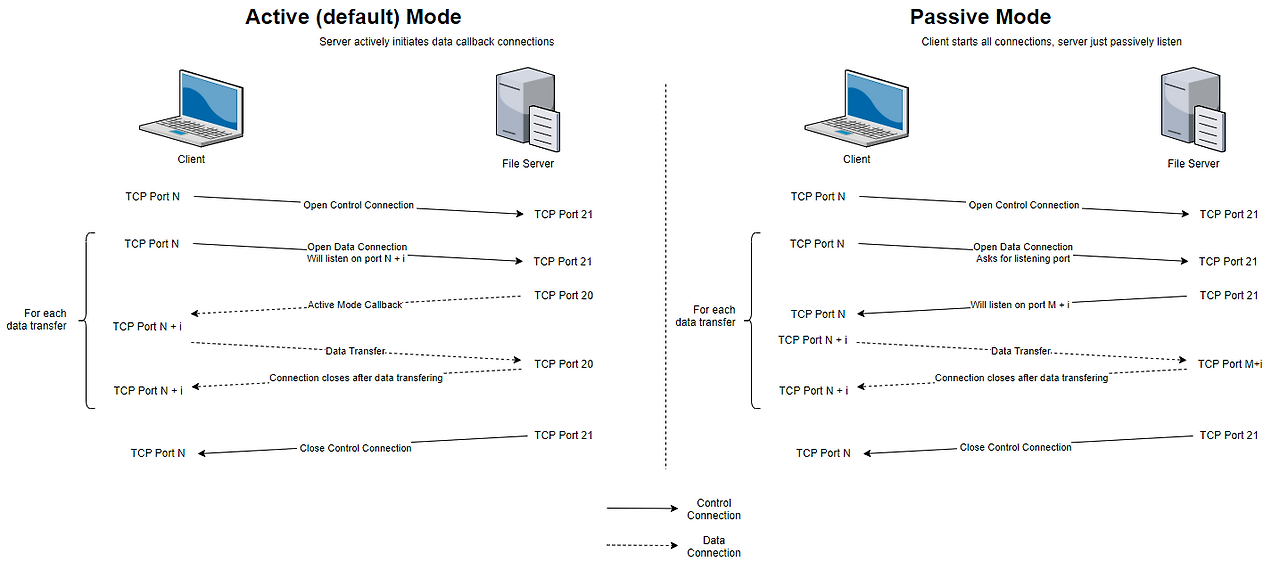
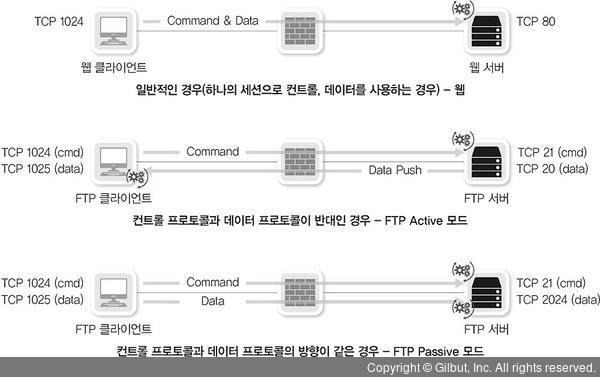
FTP는 Control Channel(21번 포트)과 Data Channel을 분리하여 사용한다.
Active Mode
- 클라이언트 → 서버 : Control Connection (TCP 21)
- 서버 → 클라이언트 : Data Connection (TCP 20)
특징
- 서버가 클라이언트로 연결
- 클라이언트 방화벽에서 차단될 가능성 높음
Passive Mode
- 클라이언트 → 서버 : Control Connection (TCP 21)
- 클라이언트 → 서버 : Data Connection (서버가 지정한 포트)
특징
- 클라이언트가 데이터 연결
- NAT / 방화벽 환경에서 안정적
Active vs. Passive Modes Connection Flows
컨트롤 프로토콜과 데이터 프로토콜이 다른 경우의 고려사항
4. Active Mode 테스트
설정
pasv_enable=NOFTP 접속 테스트
$ ftp ftp.scbyun.com
Connected to ftp.scbyun.com (ftp.scbyun.com).
220 Welcome to blah FTP service.

Name (ftp.scbyun.com:root): ftpuser1
331 Please specify the password.
Password:ftpuser1

230 Login successful.
Remote system type is UNIX.
Using binary mode to transfer files.
디렉터리 조회
ftp> ls
550 Permission denied.
Passive mode refused.
Passive 모드 비활성화
ftp> passive
Passive mode off.
다시 실행
ftp> ls
200 PORT command successful. Consider using PASV.
150 Here comes the directory listing.
drwxr-xr-x    2 1003     1003         4096 Jan 06 10:45 ftpuser1.txt
226 Directory send OK.
종료
ftp> quit
221 Goodbye.
728x90
5. Passive Mode 테스트
설정
pasv_enable=YESFTP 접속 테스트(실패)
$ ftp ftp.scbyun.com
Connected to ftp.scbyun.com (ftp.scbyun.com).
220 Welcome to blah FTP service.

Name (ftp.scbyun.com:root): ftpuser1
331 Please specify the password.
Password:ftpuser1

230 Login successful.
Remote system type is UNIX.
Using binary mode to transfer files.
디렉터리 조회
ftp> ls
421 Service not available, remote server has closed connection
Passive mode refused.- Passive Mode는 서버의 데이터 포트가 방화벽에서 허용되지 않으면 연결 실패할 수 있다.
Passive 모드 비활성화
ftp> passive
Passive mode off.
다시 실행
ftp> ls
Not connected.
종료
ftp> quit
221 Goodbye.
FTP 접속 테스트(성공)
$ ftp ftp.scbyun.com
Connected to ftp.scbyun.com (ftp.scbyun.com).
220 Welcome to blah FTP service.

Name (ftp.scbyun.com:root): ftpuser1
331 Please specify the password.
Password:ftpuser1

230 Login successful.
Remote system type is UNIX.
Using binary mode to transfer files.
Passive 모드 비활성화
ftp> passive
Passive mode off.
디렉토리 조회
ftp> ls
200 PORT command successful. Consider using PASV.
150 Here comes the directory listing.
drwxr-xr-x    2 1003     1003         4096 Jan 06 10:45 ftpuser1.txt
226 Directory send OK.
종료
ftp> quit
221 Goodbye.
6. vsftpd 운영 설정
vim /etc/vsftpd.conflisten=YES
listen_ipv6=NO
anonymous_enable=NO
local_enable=YES
write_enable=YES
local_umask=022
dirmessage_enable=YES
use_localtime=YES
xferlog_enable=YES
connect_from_port_20=YES
xferlog_file=/var/log/vsftpd.log
xferlog_std_format=YES
idle_session_timeout=600
data_connection_timeout=120
ftpd_banner=Welcome to blah FTP service.
chroot_local_user=YES
chroot_list_enable=YES
chroot_list_file=/etc/vsftpd.chroot_list
secure_chroot_dir=/var/run/vsftpd/empty
pam_service_name=vsftpd
allow_writeable_chroot=YES
userlist_enable=NO
userlist_file=/etc/vsftpd.user_list
userlist_deny=NOPassive Mode 포트 설정
Passive Mode 사용 시 데이터 포트 범위를 지정해야 한다.
pasv_enable=YES
pasv_min_port=50100
pasv_max_port=50200
이 포트 범위는 방화벽에서 허용되어야 한다.
사용자 설정
chroot 설정
vim /etc/vsftpd.chroot_listftpuser1사용자 목록
vim /etc/vsftpd.user_listftpuser1서비스 재시작
systemctl restart vsftpd7. 방화벽 오픈
Passive Mode 사용 시 다음 포트를 열어야 한다.
- 21 : FTP Control
- 20 : Active Mode Data
- 50100~50200 : Passive Mode Data

8. 클라이언트 접속 테스트
Linux 클라이언트
$ ftp ftp.scbyun.com
Connected to ftp.scbyun.com (ftp.scbyun.com).
220 Welcome to blah FTP service.
Name (ftp.scbyun.com:root): ftpuser1
331 Please specify the password.
Password:
230 Login successful.
Remote system type is UNIX.
Using binary mode to transfer files.
ftp> passive
Passive mode off.

# 접속 후 테스트
ftp> ls
200 PORT command successful. Consider using PASV.
150 Here comes the directory listing.
-rw-rw-r--    1 1003     1003           13 Jan 06 13:33 ftpuser1.txt
226 Directory send OK.

# 파일 다운로드
ftp> get ftpuser1.txt
local: ftpuser1.txt remote: ftpuser1.txt
200 PORT command successful. Consider using PASV.
150 Opening BINARY mode data connection for ftpuser1.txt (13 bytes).
226 Transfer complete.
13 bytes received in 5.8e-05 secs (224.14 Kbytes/sec)
ftp> quit
221 Goodbye.
원도우 클라이언트
>ftp ftp.scbyun.com
ftp.scbyun.com에 연결되었습니다.
220 Welcome to blah FTP service.
200 Always in UTF8 mode.
사용자(ftp.scbyun.com:(none)): ftpuser1
331 Please specify the password.
암호:
230 Login successful.

# 파일 조회
ftp> ls
200 PORT command successful. Consider using PASV.
150 Here comes the directory listing.
ftpuser1.txt
226 Directory send OK.
ftp: 0.00초 8.50KB/초

# 파일 다운로드
ftp> get ftpuser1.txt
200 PORT command successful. Consider using PASV.
150 Opening BINARY mode data connection for ftpuser1.txt (13 bytes).
226 Transfer complete.
ftp: 0.00초 13000.00KB/초
ftp> quit
221 Goodbye.
728x90
반응형
'리눅스' 카테고리의 다른 글
| SSH 키 생성과 설정을 통해 SSH 자동 로그인을 구현 (0) | 2014.11.04 |
|---|---|
| GlusterFS를 구축하는 방법 (0) | 2014.11.03 |
| Citrix XenServer에서 로컬 디스크를 추가하는 방법 (0) | 2014.10.29 |
| YUM Local Repository를 구성하는 방법 (0) | 2014.10.17 |
| CentOS 7에서 YUM SCL Repository를 사용하는 방법 (0) | 2014.10.16 |


