728x90
반응형
macOS에서 Ansible을 설치하는 방법
테스트 환경
운영체제 정보
system_profiler SPSoftwareDataType | egrep 'System Version' System Version: macOS 12.5 (21G72)Homebrew를 이용한 Ansible 설치
설치 가능 패키지 확인
brew search ansible==> Formulae
ansible ansible-cmdb ansible-language-server ansible-lint ansible@2.8 ansible@2.9
==> Casks
ansible-dk기본적으로 ansible 최신 버전을 설치하는 것을 권장합니다.
특정 레거시 환경이 아니라면 ansible@2.x는 사용하지 않는 것이 좋습니다.
패키지 상세 정보 확인
brew info ansibleansible: stable 5.7.1 (bottled), HEAD
Automate deployment, configuration, and upgrading
https://www.ansible.com/
Not installed
From: https://github.com/Homebrew/homebrew-core/blob/HEAD/Formula/ansible.rb
License: GPL-3.0-or-later
==> Dependencies
Build: pkg-config ✔, rust ✔
Required: libyaml ✘, openssl@1.1 ✘, python@3.10 ✘, six ✔
==> Options
--HEAD
Install HEAD version
==> Analytics
install: 59,505 (30 days), 159,547 (90 days), 607,420 (365 days)
install-on-request: 58,821 (30 days), 157,531 (90 days), 598,085 (365 days)
build-error: 1 (30 days)Ansible은 Python 기반이므로 Python 버전 의존성을 반드시 확인해야 합니다.
Ansible 설치
brew install ansibleRunning `brew update --preinstall`...
...
==> rust
zsh completions have been installed to:
/opt/homebrew/share/zsh/site-functions728x90
설치 확인
Ansible 버전 정보
ansible --versionansible [core 2.13.2]
config file = None
configured module search path = ['/Users/test/.ansible/plugins/modules', '/usr/share/ansible/plugins/modules']
ansible python module location = /opt/homebrew/Cellar/ansible/6.2.0/libexec/lib/python3.10/site-packages/ansible
ansible collection location = /Users/test/.ansible/collections:/usr/share/ansible/collections
executable location = /opt/homebrew/bin/ansible
python version = 3.10.6 (main, Aug 8 2022, 04:20:17) [Clang 13.1.6 (clang-1316.0.21.2.5)]
jinja version = 3.1.2
libyaml = TrueAnsible 상제 정보
brew info ansible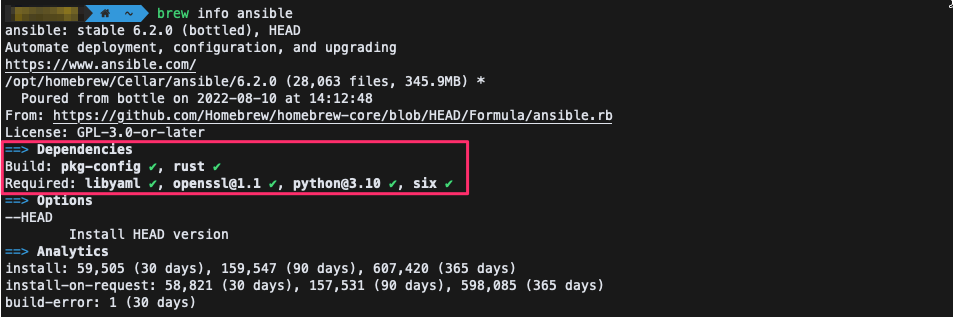
기본 동작 테스트
Ansible 설정 파일 생성
mkdir -p ~/.ansiblevim ~/.ansible.cfg[defaults]
inventory = ./hosts
host_key_checking = False
retry_files_enabled = False실행
ansible localhost -m pinglocalhost | SUCCESS => {
"changed": false,
"ping": "pong"
}
참고URL
- https://github.com/ansible/ansible
- https://docs.ansible.com/ansible/devel/roadmap/
- https://docs.ansible.com/ansible/devel/roadmap/ROADMAP_2_13.html
728x90
반응형
'맥(솔라리스)' 카테고리의 다른 글
| [mac] parallels desktop command-line (0) | 2022.08.22 |
|---|---|
| macOS에서 Python ModuleNotFoundError: No module named 'PIL' 해결하는 방법 (0) | 2022.08.16 |
| macOS 버전 정보 확인(command) (0) | 2022.08.10 |
| Mac에서 IPSec VPN(VPN 클라이언트) 구성 (0) | 2022.07.25 |
| vscode 단축키(keyboard shortcuts) (0) | 2022.07.20 |


